Quick Answer
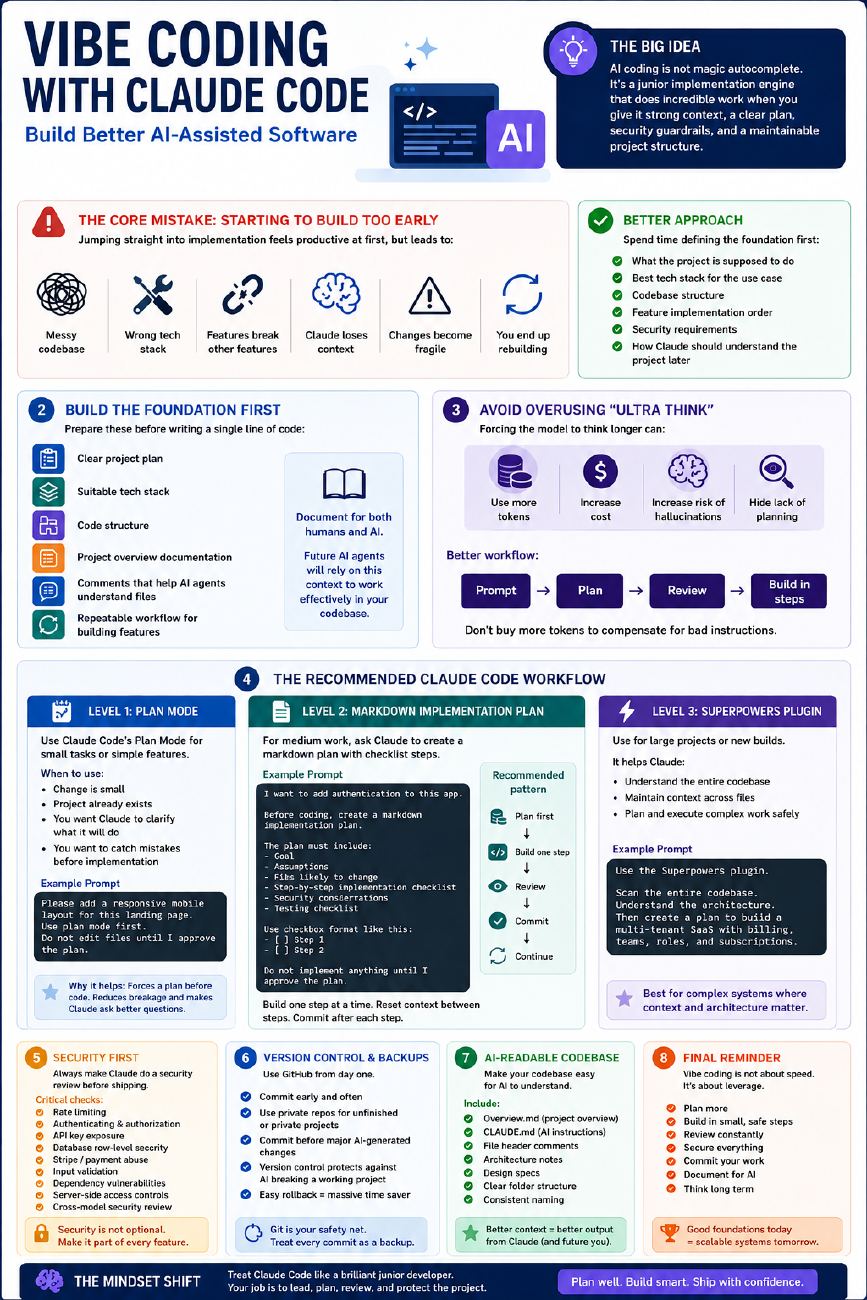
Vibe coding with Claude Code works best when it is treated as a disciplined engineering workflow, not magic autocomplete. The useful pattern is: plan first, implement one small step, review the diff, commit a stable checkpoint, and run security checks before launch.
Claude can generate code quickly, but speed cuts both ways. It can help you build a feature in minutes, and it can also spread bad assumptions across a codebase just as fast. The difference is not only the model. The difference is how much context, structure, and verification you put around the work.
The practical rule is simple: treat Claude Code like a fast implementation partner that needs strong context, a clear plan, security constraints, and a maintainable project structure.
Most failed vibe-coded projects do not fail because the AI model is useless. They fail because the human operator skips the foundation work.
This connects directly to my faster build workflow in From Idea to Live Site: How I Build AI-Powered Websites in a Day. That post is about shipping quickly; this one is about keeping the AI coding process controlled enough that the shipped project remains maintainable.
1. The Core Mistake: Starting to Build Too Early
The biggest mistake is jumping straight into implementation.
Many people open Claude Code and immediately ask it to build a project or feature. At first, this feels productive. The model generates code quickly, the project appears to work, and the user keeps adding more features.
The problem appears later:
- The codebase becomes messy.
- The wrong tech stack may have been chosen.
- Features start breaking other features.
- Claude loses context.
- Future changes become fragile.
- The user eventually has to rebuild the project properly.
Poor foundation work creates technical debt almost immediately. The cost is not always visible in the first hour, but it compounds as the project grows.
Better Approach
Before building anything, spend time defining:
- What the project is supposed to do.
- The best tech stack for the use case.
- The structure of the codebase.
- The feature implementation order.
- The security requirements.
- How Claude should understand the project later.
This upfront work may take hours, but skipping it can cost days or weeks later.
2. Build the Foundation First
A good vibe-coded project needs a foundation before feature implementation begins.
Before implementation, prepare:
- A clear project plan
- A suitable tech stack
- A code structure
- Project overview documentation
- Comments that help AI agents understand files
- A repeatable workflow for building features
The goal is not to make the project readable only for humans. The goal is also to make the project readable for future AI agents.
This is a major shift in how to think about documentation. In AI-assisted development, documentation is not only for maintainers. It is also operational context for the model.
3. Avoid Overusing “Ultra Think”
Do not use Claude’s high-effort thinking modes, such as “ultra think”, as the default answer to every problem.
The problem is not that deeper reasoning is always bad. The problem is using it as a substitute for planning.
Forcing the model to think longer can:
- Use more tokens.
- Increase cost.
- Potentially increase hallucination risk.
- Hide the fact that the user has not provided enough structure.
The better workflow is not:
Prompt -> Ultra Think -> Build everything
The better workflow is:
Prompt -> Plan -> Review -> Build in controlled steps
The point is blunt: do not buy more tokens to compensate for bad instructions.
4. The Recommended Claude Code Workflow
A useful Claude Code workflow has three planning levels.
Level 1: Use Plan Mode
For small tasks or simple features, use Claude Code’s Plan Mode.
Plan Mode forces Claude to produce a plan before writing code. This gives the user a chance to inspect the intended approach before Claude changes files.
When to Use It
Use Plan Mode when:
- The change is small.
- The project already exists.
- You want Claude to clarify what it will do.
- You want to catch obvious mistakes before implementation.
Example Prompt
Please add a responsive mobile layout for this landing page.
Use plan mode first.
Do not edit files until I approve the plan.
Why It Helps
Plan Mode reduces accidental breakage because Claude must explain the work before doing it.
It also encourages the model to ask follow-up questions when context is missing.
Level 2: Ask Claude to Write a Markdown Implementation Plan
For medium-complexity work, ask Claude to create a markdown plan with checklist steps.
Instead of relying only on Plan Mode, ask Claude to create a dedicated .md plan file.
Example Prompt
I want to add authentication to this app.

Before coding, create a markdown implementation plan.

The plan must include:
- Goal
- Assumptions
- Files likely to change
- Step-by-step implementation checklist
- Security considerations
- Testing checklist

Use checkbox format like this:
- [ ] Step 1
- [ ] Step 2

Do not implement anything until I approve the plan.
Why the Checklist Matters
A checklist allows Claude to work incrementally.
Instead of asking the model to build everything in one shot, you can say:
Implement only step 1 from the plan.
Stop after that and report what changed.
Then reset or reduce context, provide the plan again, and continue with step 2.
This keeps each implementation session focused and lowers the chance of the model corrupting unrelated parts of the project.
Recommended Pattern
Plan first.
Build one step.
Review.
Commit.
Continue.
That is slower than one-shot generation, but much safer.
Level 3: Use the Superpowers Plugin
For larger projects or new builds, consider using the Superpowers plugin in Claude Code.
The plugin creates a more disciplined workflow before implementation begins.
The workflow should look like this:
Brainstorming -> Design Spec -> Implementation Plan -> Build
Why This Matters
The plugin forces Claude to behave more like a structured developer rather than a code generator.
It asks clarifying questions, creates a design specification, and then creates an implementation plan before building.
This is especially useful when starting a new project because the earliest architectural decisions are the most expensive to reverse later.
When to Use Superpowers
Use it for:
- New applications.
- Full landing pages.
- Complex features.
- Projects with multiple moving parts.
- Anything that needs architecture decisions.
- Anything likely to grow over time.
When Not to Use It
You probably do not need it for:
- Small bug fixes.
- Minor copy changes.
- One CSS adjustment.
- A simple refactor inside a known file.
The real rule: use heavier planning when the cost of being wrong is high.
5. Security Is Not Optional
Vibe-coded applications can be insecure if the user does not actively instruct the model to check for security issues.
This is especially important when the app includes:
- Authentication
- Payments
- API endpoints
- Database access
- User-generated content
- File uploads
- Admin dashboards
- External API usage
- Usage-based billing services
The risk is practical, not theoretical. A poorly protected endpoint can be abused and create large API bills or expose user data.
6. Run Security Reviews Before Launch
Run a security review before shipping any project or major update.
Example Security Review Prompt
Perform a security review of this project before launch.

Check for:
- Exposed secrets
- Unsafe API endpoints
- Missing authentication checks
- Missing authorization checks
- Missing rate limiting
- Insecure database access
- Broken row-level security
- Payment or Stripe abuse paths
- Input validation issues
- File upload risks
- Client-side exposure of private logic
- Dependency risks

Think like an attacker.
Report issues by severity.
Do not fix anything until you show me the findings.
Important Security Areas
Rate Limiting
Rate limiting is often missed in AI-generated applications.
Without rate limiting, someone may repeatedly hit an endpoint and trigger:
- High API usage
- High LLM usage
- Email/SMS abuse
- Payment service abuse
- Denial of service
Ask Claude specifically to check rate limiting.
Check every public API endpoint.
Identify where rate limiting is missing.
Recommend a rate limiting strategy.
Row-Level Security
For database-backed apps, especially Supabase-style systems, row-level security must be verified.
A dangerous failure mode is allowing one user to access another user’s data.
Review all database access paths.
Verify that users can only access their own records.
Check whether row-level security is enabled and correctly enforced.
Payment Abuse
If the app uses Stripe or another payment provider, ask the model to think through abuse scenarios.
Review the Stripe integration.
Look for ways a user could bypass payment, replay webhooks, fake plan status, or trigger paid services without authorization.
7. Use Multiple Models for Security Review
For higher-risk work, use more than one AI model for security checks.
For example:
- Ask Claude Code to review the project.
- Ask Codex or another model to review the same project.
- Compare findings.
- Ask each model to focus on specific abuse paths.
This is sensible because different models may catch different issues.
Do not ask generally, “Is this secure?” That is weak.
Ask targeted questions:
- Can someone abuse this API?
- Can someone bypass authentication?
- Can someone access another user’s data?
- Can someone trigger paid API usage?
- Can someone fake a webhook?
- Can someone upload dangerous files?
- Can someone inject script or SQL?
- Can secrets leak to the browser?
Security review should be adversarial and specific.
8. Save Rollback Points with Git
A common beginner mistake is building a working project without saving versions properly.
Then, when Claude makes a bad change, there is no reliable rollback point.
Use Git locally, and push to GitHub or another remote when the project matters.
Minimum Git Workflow
git init
git add .
git commit -m "Initial working version"
git branch -M main
git remote add origin <your-private-repo-url>
git push -u origin main
After every stable milestone:
git add .
git commit -m "Add responsive landing page"
git push
Why This Matters
Git gives you:
- Version history
- Rollback points
- Collaboration
- Cloud backup
- Safer experimentation
- A clean way to inspect AI-generated changes
Practical Rule
Before asking Claude to make a risky change, commit the current working state.
git status
git add .
git commit -m "Working state before layout refactor"
Then let Claude work.
If Claude breaks the project, you can recover.
9. Make the Codebase AI-Readable
AI coding works better when the codebase is designed for AI context.
A large codebase can consume many tokens if the model has to inspect many files repeatedly.
Create a project overview file and instruct Claude to use it.
10. Create an overview.md File
Ask Claude to create an overview.md file that explains the project.
Example Prompt
Create an overview.md file for this project.

It should include:
- Project purpose
- Tech stack
- Folder structure
- What each important file does
- How the main files connect
- Key data flows
- API routes
- Authentication flow
- Database structure
- Styling system
- Important implementation notes
- Known risks or fragile areas
Why It Helps
An overview.md file helps future Claude sessions understand the project faster.
Benefits:
- Less context waste
- Lower token usage
- Faster debugging
- Better architectural understanding
- Fewer accidental edits to unrelated files
This is not optional for serious projects. It is cheap to create and expensive to skip.
11. Create or Update CLAUDE.md
Claude Code can use a CLAUDE.md file as project-specific instruction context.
Use /init to create it, then tell Claude to reference overview.md.
Example CLAUDE.md
# Claude Instructions

Before making changes, read `overview.md` to understand the project structure.

## Working Rules

- Do not make broad unrelated changes.
- Prefer small, focused edits.
- Explain files changed after each implementation.
- Update `overview.md` when architecture changes.
- Ask before changing core architecture.
- Run tests or type checks where available.
- Do not introduce new dependencies without explaining why.
This gives Claude a standing operating procedure inside the project.
12. Add AI-Friendly File Header Comments
Add short comments at the top of important source files.
These comments are not mainly for the human developer. They are for the AI agent.
Example File Header
/**
 * File: src/app/api/chat/route.ts
 *
 * Purpose:
 * Handles chat requests from the frontend and forwards them to the LLM provider.
 *
 * Connected files:
 * - src/lib/auth.ts: validates the current user
 * - src/lib/rate-limit.ts: limits request frequency
 * - src/lib/llm.ts: wraps the LLM provider API
 *
 * Security notes:
 * - Must require authentication
 * - Must enforce rate limiting
 * - Must not expose provider API keys to the client
 */
Why It Helps
When Claude opens a file, it immediately gets:
- The file’s purpose
- Its dependencies
- Its security constraints
- How it fits into the project
This can reduce bad edits and speed up debugging.
13. The Full Recommended Workflow
A practical workflow looks like this:
1. Define the project goal.
2. Ask Claude to discuss the tech stack.
3. Create a design spec.
4. Create an implementation plan.
5. Build one step at a time.
6. Commit each stable milestone to Git.
7. Create overview.md.
8. Create or update CLAUDE.md.
9. Add AI-friendly file comments.
10. Run security reviews.
11. Ask another model to review security.
12. Fix issues.
13. Commit the launch-ready version.
This is the difference between casual prompting and controlled AI-assisted engineering.
14. What to Build: Avoid Generic Software
There is also a product lesson here: be deliberate about what kind of software is worth building.
Generic software is at higher risk of being copied or replaced as AI tools become more capable.
For example, if AI can generate a simple screen recording app quickly, users may not continue paying for generic screen recording software.
The better opportunity is in niche, expertise-driven software.
Better Product Direction
Build products where you have:
- Domain expertise
- Industry knowledge
- A specific workflow advantage
- Access to real users
- A painful problem to solve
- A unique data or process insight
Examples
Weak direction:
A generic task management app.
Stronger direction:
A quoting tool for solar installers that understands local pricing, installation constraints, government rebates, and customer proposal workflows.
The value is not just the code. The value is the domain expertise embedded into the product.
15. Key Takeaways
- Do not start coding immediately.
- Planning is not bureaucracy. It is how you avoid expensive rework.
- Use Plan Mode for small changes.
- Use markdown implementation plans for medium-complexity changes.
- Use structured workflows like Superpowers for larger projects.
- Do not rely on “ultra think” to fix bad prompting.
- Build one step at a time.
- Commit working versions to GitHub.
- Run security reviews before launching.
- Check rate limiting, row-level security, auth, payments, and API abuse paths.
- Use multiple models for security review where practical.
- Create
overview.mdso AI agents can understand the codebase. - Create
CLAUDE.mdto define project-specific working rules. - Add AI-friendly file header comments.
- Build niche, expertise-driven products rather than generic tools.
16. Practical Claude Code Prompt Pack
Project Foundation Prompt
I want to build this project properly, not rush into coding.

First, help me define:
- The product goal
- Target users
- Core features
- Recommended tech stack
- Folder structure
- Security considerations
- Risks and tradeoffs

Do not write code yet.
Ask clarifying questions if needed.
Design Spec Prompt
Create a design specification for this project.

Include:
- User flows
- Pages or screens
- Components
- Data model
- API endpoints
- Authentication and authorization requirements
- Security requirements
- Error states
- Responsive behaviour
- Testing strategy

Do not implement yet.
Implementation Plan Prompt
Create an implementation-plan.md file.

Use checkbox steps.

Each step should include:
- Goal
- Files likely to change
- Implementation details
- Validation method
- Security notes

Break the work into small steps that can be implemented one at a time.
Do not code yet.
Step-by-Step Build Prompt
Implement only step 1 from implementation-plan.md.

Rules:
- Do not implement later steps.
- Keep the change small.
- Show files changed.
- Explain how to test it.
- Stop after completing this step.
Security Review Prompt
Perform a security review of the current project.

Think like an attacker.

Check:
- Authentication bypass
- Authorization flaws
- Missing rate limits
- Exposed secrets
- Unsafe API endpoints
- Database access issues
- Row-level security
- Payment abuse
- Webhook replay or forgery
- Input validation
- File upload risks
- XSS
- SSRF
- Dependency risks

Return findings by severity.
Do not fix anything until I approve.
AI-Readable Codebase Prompt
Create an overview.md file that explains this codebase for future AI agents.

Include:
- Project purpose
- Tech stack
- Folder structure
- Important files
- How files connect
- Main data flows
- API routes
- Auth flow
- Database structure
- Security assumptions
- Known fragile areas
File Header Comment Prompt
Add concise file header comments to important source files.

Each header should explain:
- What the file does
- Which files it connects to
- Important constraints
- Security notes where relevant

Do not add noisy comments inside obvious code.
Focus on helping future AI agents understand the project quickly.
17. Final Opinion
The strongest lesson is that vibe coding rewards discipline, not randomness.
The beginner mistake is thinking:
AI can code, so planning matters less.
The better mindset is:
AI can code fast, so planning matters more.
Because the model can generate a lot of code quickly, it can also generate a lot of bad architecture quickly. The human operator’s job is to constrain the model with context, structure, sequencing, and verification.
Vibe coding is not about typing less. It is about directing software creation with enough precision that the AI can execute safely.