What is my workflow, and what did I want to achieve?
I run an AI agency, Artisan Intuition (artisanintuition.com), where I periodically build websites, landing pages, dashboards, product interfaces, campaign pages, and other digital experiences. A recurring part of that work is turning functional ideas into something that looks professional, credible, and visually strong enough to hold attention.
My usual workflow already combines tools such as Claude Code, Codex, Antigravity, and content-generation platforms. That works well for engineering and implementation, but I wanted to strengthen the design layer of the workflow as well.
OpenDesign caught my attention because it is open source and provides another way to explore layouts, visual patterns, interface directions, and design ideas that I can then refine into client-ready deliverables. I wanted to use it alongside the AI coding agents I already rely on, rather than introduce an entirely separate development environment.
That led to a more fundamental architectural question:
Where should the actual development environment live?
Windows gives me the desktop experience I want - Chrome, shortcuts, native applications, launchers, and a familiar UI. But increasingly, the development stack itself belongs in Linux: coding agents, Node, Git, package managers, project files, credentials, local services, and command-line tooling.
The obvious temptation was to split the setup.
Run OpenDesign on Windows.
Run OpenCode, Codex, Claude, Gemini, Antigravity, Node, Git, and the projects inside WSL.
That would work, but it would create two development environments with different paths, credentials, runtimes, process models, and tooling.
I wanted something cleaner.
The architecture I ended up with is:
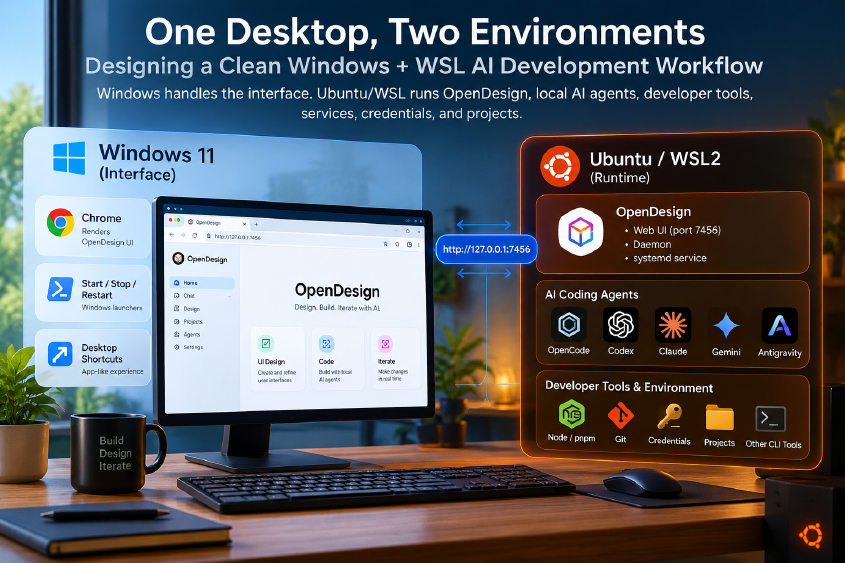
Windows handles the interface. Ubuntu/WSL owns the runtime.
OpenDesign itself runs inside WSL alongside the AI coding agents and development tools. Windows simply presents the experience through Chrome and a few lightweight launchers.
The result feels like a Windows application without moving the actual development runtime out of Linux.
The architecture I wanted
The target was not:
Windows OpenDesign
→ WSL agents
It was this:
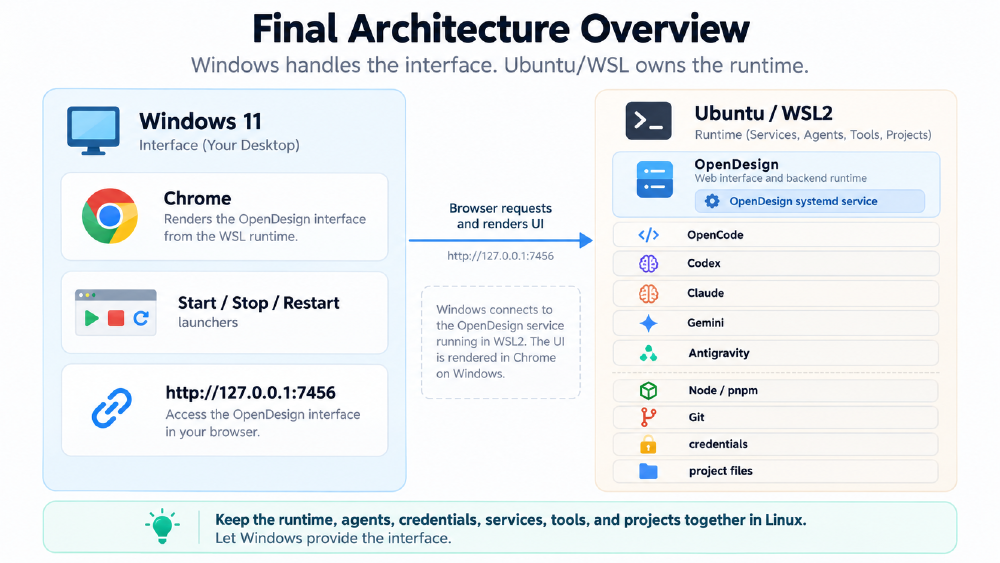
Windows 11
│
├── Chrome
├── Start / Stop / Restart launchers
│
└── http://127.0.0.1:7456
         │
         ▼
Ubuntu / WSL2
│
├── OpenDesign
├── OpenDesign systemd service
├── OpenCode
├── Codex
├── Claude
├── Gemini
├── Antigravity
├── Node / pnpm
├── Git
├── credentials
└── project files
The guiding rule became:
Keep the runtime, agents, credentials, services, tools, and projects together in Linux. Let Windows provide the interface.
That one decision simplified almost everything that followed.
Why WSL should own the development runtime
There are several ways to combine Windows and WSL.
One common approach is to install the main application on Windows, then connect it to tools and files living inside WSL.
That looks convenient initially, but it introduces ambiguity:
- Windows paths versus Linux paths
- where credentials live
- which Node installation is being used
- which environment owns package managers
- where agent subprocesses execute
- whether tools see Windows files or WSL files
- which shell configuration is active
- how localhost services are exposed
- how browser callbacks work
- how child processes are cleaned up
- which runtime should be updated when something breaks
For AI coding agents, these details matter.
Tools such as OpenCode, Codex, Claude, Gemini, and Antigravity are not just chat interfaces. They inspect files, execute commands, launch processes, authenticate against remote services, and depend heavily on their local environment.
That makes the correct boundary clearer:
The agent runtime should live next to the project runtime.
Since my projects and CLI tooling already live inside Ubuntu on WSL, OpenDesign should live there too.
Windows should not become a second development machine.
Defining the boundary: Windows for UX, WSL for runtime
The final separation is simple.
Windows owns
- Chrome
- desktop shortcuts
- Start menu integration
- PowerShell launchers
- CMD launchers
- visual interaction
- day-to-day desktop UX
WSL owns
- OpenDesign
- OpenCode
- Codex
- Claude
- Gemini
- Antigravity
- Node
- pnpm
- Git
- credentials
- environment variables
- project files
- systemd services
- local development processes
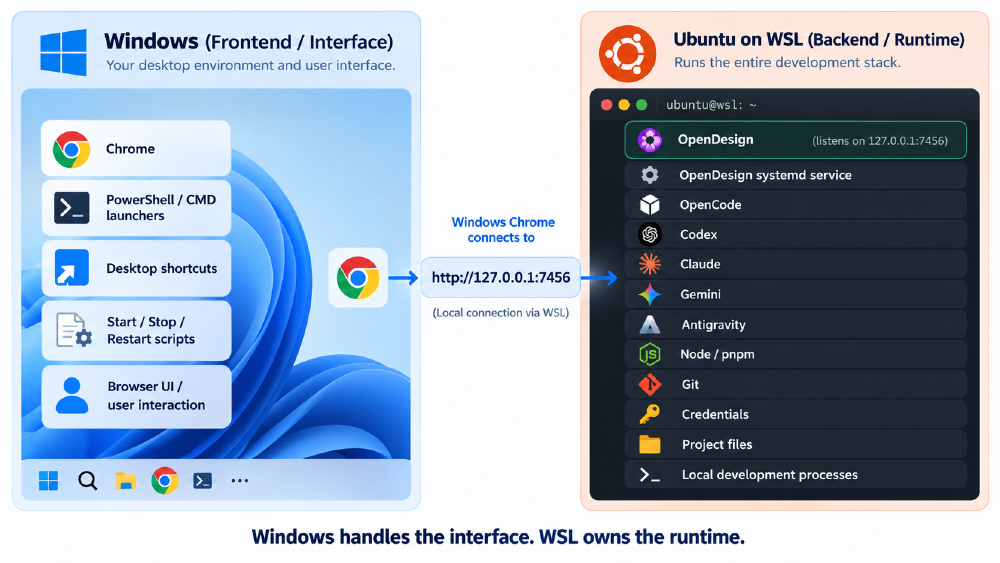
That gives the setup a much cleaner mental model.
Windows is not hosting the development environment.
Windows is exposing it.
Installing OpenDesign from source inside WSL
I installed OpenDesign directly from its Git repository inside Ubuntu.
My checkout lives under ~/tools/ directory:
For example:
~/tools/open-design
After installing dependencies, the obvious development command was:
pnpm tools-dev run web
This worked, but it revealed the first architectural problem.
A typical startup looked like:
Web:    http://127.0.0.1:42373/
Daemon: http://127.0.0.1:44757/
The ports changed every time.
That is fine for source development. The tooling can dynamically allocate free ports.
But it is inconvenient if you want OpenDesign to behave like a stable local application.
I did not want to bookmark a new URL every session or keep reconfiguring a Windows client.
That eventually pushed the setup away from dev-mode ports and toward one stable endpoint.
The od command collision
OpenDesign provides an od command.
Linux already has:
/usr/bin/od
which is the GNU octal dump utility.
That creates a real command collision.
Running:
type -a od
showed both versions.
The OpenDesign wrapper needed to appear before the Linux utility:
/home/<user>/.local/bin/od
/usr/bin/od
/bin/od
At first this looked like a minor PATH issue.
Later, it became one of the most important details in the architecture because systemd and interactive shells do not necessarily resolve commands the same way.
The lesson is simple:
Never assume a command name is unambiguous just because it works in your terminal.
When systemd, cron, WSL launchers, or non-interactive shells are involved, explicit command paths are safer.
Cleaning up PATH properly
During setup I also noticed that repeatedly sourcing .bashrc duplicated PATH entries.
The cause was the common pattern:
export PATH="$HOME/.local/bin:$PATH"
Every time .bashrc is sourced, the same directory gets prepended again.
I replaced that with an idempotent helper.
Conceptually:
path_prepend() {
  case ":$PATH:" in
    *":$1:"*) ;;
    *) PATH="$1:$PATH" ;;
  esac
}
That gave predictable ordering for:
~/.local/bin- OpenCode
- Vela
- Composio
- other CLI tools
and prevented PATH inflation.
This is a small detail, but in a WSL environment full of CLI tooling it is worth fixing early.
There were few issues starting Open Design succefully.
Resolving the Vela CLI error
Before the browser-integration issue, OpenDesign failed earlier in the onboarding flow with:
vela binary not found; install vela or configure VELA_BIN
This was not related to the Linux od command conflict. OpenDesign was trying to use the Vela CLI, but Vela was not installed or discoverable inside the WSL environment.
I installed Vela into a user-owned directory rather than mixing it into the system Node installation:
VELA_PREFIX="$HOME/.local/share/vela"

npm install --global \
  --prefix "$VELA_PREFIX" \
  @powerformer/vela-cli
Then I added its binary directory to PATH:
export VELA_PREFIX="$HOME/.local/share/vela"
and, using my path_prepend helper:
path_prepend "$VELA_PREFIX/bin"
The equivalent direct PATH configuration would be:
export PATH="$VELA_PREFIX/bin:$PATH"
After reloading the shell:
source ~/.bashrc
I verified the installation:
which vela
vela --version
The expected result was that vela resolved somewhere under:
~/.local/share/vela/bin/vela
At that point the original:
vela binary not found
error disappeared.
However, authentication exposed a second WSL-specific issue.
Running:
vela login
successfully generated a device activation URL and code, but Vela reported:
Warning: could not open browser automatically:
open browser: exec: "xdg-open": executable file not found in $PATH
That was a separate problem. Vela itself was now working, but it expected the standard Linux xdg-open mechanism to launch the authentication URL. Since my browser runs on Windows while Vela runs inside WSL, I needed a small WSL-to-Windows browser bridge.
That leads directly to the next part of the setup.
Browser launching from WSL into Windows
The next issue appeared during Vela authentication.
OpenDesign reached the login flow, but Vela could not open the browser.
The error was:
exec: "xdg-open": executable file not found in $PATH
WSL interoperability itself was working.
For example:
/mnt/c/Windows/explorer.exe https://example.com
could launch something on the Windows side.
But Linux applications expect Linux conventions.
Vela wanted:
xdg-open
Windows uses a different mechanism for opening URLs.
So I needed an explicit bridge.
Why explorer.exe was not enough
The first wrapper used:
explorer.exe
That worked for simple cases, but at one point Windows opened the Documents folder instead of the intended web page.
Then I tried:
cmd.exe /c start
That opened URLs more reliably, until query parameters contained:
&
The Windows command shell interpreted the ampersand as a command separator and truncated the URL.
That is a problem for authentication links, which often contain multiple query parameters.
The better approach was to call Windows’ registered URL protocol handler directly.
~/.local/bin/xdg-open
#!/usr/bin/env bash
set -euo pipefail

if [[ $# -ne 1 ]]; then
    printf 'Usage: xdg-open URL\n' >&2
    exit 1
fi

exec /mnt/c/Windows/System32/rundll32.exe \
    url.dll,FileProtocolHandler "$1"
and then
chmod +x ~/.local/bin/xdg-open
I also created a matching browser wrapper:
~/.local/bin/win-browser
#!/usr/bin/env bash
exec /mnt/c/Windows/System32/rundll32.exe url.dll,FileProtocolHandler "$1"
chmod +x ~/.local/bin/win-browser
and exported:
export BROWSER="$HOME/.local/bin/win-browser"
This gave Linux tools a reliable way to say:
“Open this URL”
while Windows remained responsible for the actual browser.
Keeping Windows PATH out of Linux
My WSL configuration intentionally uses:
/etc/wsl.conf
including:
appendWindowsPath = false
I prefer this because I do not want every Windows executable directory injected into Linux PATH.
That keeps command resolution cleaner and reduces accidental collisions.
Instead of globally exposing Windows executables to Linux, I use targeted bridges for the exact integration points I need.
That leads to a better principle:
Prefer explicit interoperability over global path mixing.
NVM, Node, Corepack, and pnpm
Another issue appeared after opening a fresh terminal.
pnpm disappeared.
Further inspection showed that Node itself was not active.
Running:
nvm current
returned:
none
while:
nvm ls
showed Node was installed.
The problem was the default alias.
It pointed to:
lts/*
but the latest LTS alias had moved to a version that was not installed locally.
The fix was to pin the default Node version explicitly.
Conceptually:
nvm use 24
nvm alias default 24
That made new shells deterministic again.
For a development workstation with many CLI tools, I prefer explicit versions over moving aliases.
Automatic upgrades are convenient until one of the tools in the stack stops working.
Restoring pnpm through Corepack
Once Node was active again, Corepack was available.
I enabled it and restored pnpm through the Node toolchain.
# Verify Corepack is available from the active Node installation
command -v corepack
corepack --version

# Enable package-manager shims for the current Node version
corepack enable
hash -r

# Let Corepack provision the pnpm version required by the project
pnpm --version
The key decision here was not to mix:
- Ubuntu’s Node packages
- NVM-managed Node
- random global npm installs
- system package managers
- Corepack-managed package managers
The cleaner rule is:
If NVM owns Node, keep the surrounding Node toolchain inside the same ecosystem.
That reduces version ambiguity later.
OpenDesign hosted mode versus local agents
OpenDesign supports different execution paths.
During setup I initially used the hosted login path.
That worked.
But it was not the architecture I wanted.
My objective was to use local coding agents already installed inside WSL.
That means the relevant execution model is:
OpenDesign
    ↓
Local agent CLI
    ↓
Local credentials
    ↓
Local project filesystem
rather than:
OpenDesign
    ↓
Hosted runtime
This distinction matters because authentication happens at different layers.
OpenDesign Hosted authentication does not authenticate Codex.
Vela authentication does not authenticate OpenCode.
Each local agent remains responsible for its own credentials and model configuration.
Codex authentication inside WSL
When I first selected Codex through OpenDesign, the connection failed with an authentication error.
The message indicated that the access token could not be refreshed.
The problem was not OpenDesign.
The Codex CLI itself needed to be authenticated inside WSL.
After logging into Codex directly in Ubuntu and validating that the CLI worked independently, OpenDesign’s connection test passed.
That produced a useful troubleshooting rule:
Validate the underlying CLI before debugging the orchestrator.
For any local agent, first confirm:
- does the binary run?
- is it authenticated?
- can it see the expected models?
- can it access the project?
- can it execute independently?
Only then test it through OpenDesign.
Why the Codex model list looked outdated
At one point OpenDesign only showed older Codex models.
It looked like OpenDesign had a stale model catalog.
The actual cause was simpler.
The Codex CLI itself was outdated.
After updating Codex inside WSL, the newer models appeared.
That reinforced an important design principle:
Treat OpenDesign as the orchestrator, not the owner of every tool it invokes.
OpenCode, Codex, Claude, Gemini, and other local agents should be independently managed and updated.
OpenCode compatibility problem
OpenCode was the agent I originally expected to use most heavily.
OpenDesign detected it correctly.
But the connection test failed.
The error showed that OpenDesign was launching OpenCode with flags such as:
--dir
and:
--pure
My installed OpenCode version did not support those flags.
Running:
opencode run --help
confirmed that.
I then searched the OpenDesign source and found references to those arguments.
This was not:
- a WSL problem
- an authentication problem
- a PATH problem
- an OpenCode installation problem
It was an adapter compatibility issue.
I deliberately chose not to patch the OpenDesign checkout.
That decision was important.
I want:
git pull
to remain boring.
Local patches inside a frequently updated upstream repository create future merge work.
For now, Codex works through OpenDesign and OpenCode can be revisited when compatibility improves upstream. OpenCode is still an open issue at the time of writing this article.
Why I moved away from pnpm tools-dev run web
At this point everything basically worked, but I was still using:
pnpm tools-dev run web
That command is excellent if you are developing OpenDesign itself.
It starts:
- the OpenDesign daemon
- the web development server
- development-mode routing
- separate ports
- source-oriented lifecycle tooling
But I was not modifying OpenDesign.
I was using it.
That changes the ideal runtime.
Moving to one stable OpenDesign endpoint
I tested:
od --no-open
This started OpenDesign on the predictable default endpoint:
http://127.0.0.1:7456
That was exactly what I wanted.
Initially, opening:
http://127.0.0.1:7456
in Windows Chrome returned:
404
The daemon was healthy, but the web UI had not yet been built.
Building the OpenDesign web package:
cd ~/tools/open-design

pnpm --filter @open-design/web build
the same endpoint served the UI successfully.
That simplified the architecture from:
Windows Chrome
    ↓
random web port
    ↓
random daemon port
to:
Windows Chrome
    ↓
127.0.0.1:7456
    ↓
OpenDesign web + daemon
Much cleaner.
What od --no-open means in this architecture
The command:
od --no-open
starts OpenDesign without trying to launch a browser automatically.
That is exactly what I want.
WSL owns the runtime.
Windows owns the browser.
The Windows launcher can decide when Chrome should open.
That keeps the responsibility boundary clean.
The first background-process attempt
I initially created custom scripts:
opendesign-start
opendesign-stop
opendesign-restart
The start script used:
nohup
and background execution.
This worked from an interactive WSL shell.
But launching it from Windows through:
wsl.exe
exposed a lifecycle issue.
The daemon could become healthy and then disappear after the short-lived Windows-to-WSL invocation ended.
That was a sign I was solving the wrong problem.
I did not need increasingly elaborate PID scripts.
I needed a real process manager.
Validating the runtime with a foreground launcher
Before switching to systemd, I created a simple foreground launcher.
~/bin/opendesign-run
#!/usr/bin/env bash
set -euo pipefail

export NVM_DIR="$HOME/.nvm"

if [ -s "$NVM_DIR/nvm.sh" ]; then
  . "$NVM_DIR/nvm.sh"
fi

nvm use default >/dev/null

cd "$HOME/tools/open-design"

exec od --no-open
The important line was:
exec od --no-open
No backgrounding.
No nohup.
No PID file.
When launched from Windows using:
wsl -d Ubuntu-24.04 -- bash -lc "opendesign-run"
the command stayed attached and OpenDesign worked correctly.
That proved the OpenDesign runtime itself was fine.
The remaining problem was service lifecycle.
Using systemd properly
My Ubuntu WSL installation already had systemd enabled.
So I created a systemd user service.
~/.config/systemd/user/open-design.service
[Unit]
Description=OpenDesign WSL Daemon
After=default.target

[Service]
Type=simple
ExecStart=/home/mumehta/bin/opendesign-run
WorkingDirectory=/home/mumehta/tools/open-design

Restart=on-failure
RestartSec=2

KillMode=control-group
TimeoutStopSec=15

[Install]
WantedBy=default.target
The service manages OpenDesign as a normal Linux process.
The key settings include:
Type=simple
ExecStart=...
WorkingDirectory=...
Restart=on-failure
KillMode=control-group
KillMode=control-group is especially useful.
The OpenDesign process tree includes:
- Corepack
- pnpm
- Node
- the OpenDesign daemon
Systemd manages the entire process group instead of requiring me to discover and kill individual child PIDs.
The lifecycle is now:
systemctl --user start open-design
systemctl --user stop open-design
systemctl --user restart open-design
systemctl --user status open-design
Logs are available with:
journalctl --user -u open-design
This is much cleaner than custom PID management.
The systemd od surprise
The first systemd attempt failed.
The log showed:
od: unrecognized option '--no-open'
That was confusing because:
od --no-open
worked in my normal terminal.
The explanation came back to the earlier command collision.
My interactive shell resolved:
od
to:
~/.local/bin/od
Systemd did not source .bashrc.
It resolved:
od
to:
/usr/bin/od
the GNU octal dump program.
So systemd was effectively trying to run:
/usr/bin/od --no-open
which obviously failed.
The solution was to stop relying on PATH.
The launcher now executes the OpenDesign wrapper explicitly.
~/bin/opendesign-run
#!/usr/bin/env bash
set -euo pipefail

export HOME="/home/mumehta"
export NVM_DIR="$HOME/.nvm"

# Load NVM explicitly because systemd does not source ~/.bashrc
if [ -s "$NVM_DIR/nvm.sh" ]; then
    . "$NVM_DIR/nvm.sh"
else
    echo "ERROR: NVM not found at $NVM_DIR/nvm.sh" >&2
    exit 1
fi

nvm use default >/dev/null

cd "$HOME/tools/open-design"

# Use the OpenDesign wrapper explicitly.
# Do not rely on PATH because Linux also provides /usr/bin/od.
exec "$HOME/.local/bin/od" --no-open
Conceptually:
exec "$HOME/.local/bin/od" --no-open
After that:
systemctl --user status open-design
showed:
Active: active (running)
and the logs showed:
[od] listening on http://127.0.0.1:7456
At that point, the WSL runtime was stable.
Why OpenDesign runs as a systemd user service
The service lives under:
~/.config/systemd/user/open-design.service
and is managed with:
systemctl --user
rather than a machine-wide root service.
That is intentional.
OpenDesign is part of my development environment, not a system daemon for every user.
It should run under my user context and naturally inherit access to:
- my home directory
- my project files
- my credentials
- my development tools
- my Node environment
A user service is the right abstraction.
Making the launcher self-contained
One more important detail:
systemd does not automatically load .bashrc.
So opendesign-run cannot assume that NVM, PATH modifications, or shell aliases already exist.
The launcher explicitly prepares its own environment.
opendesign-run
#!/usr/bin/env bash
set -euo pipefail

export HOME="/home/mumehta"
export NVM_DIR="$HOME/.nvm"

if [ -s "$NVM_DIR/nvm.sh" ]; then
    . "$NVM_DIR/nvm.sh"
else
    echo "ERROR: NVM not found at $NVM_DIR/nvm.sh" >&2
    exit 1
fi

nvm use default >/dev/null

cd "$HOME/tools/open-design"

exec "$HOME/.local/bin/od" --no-open
It initializes:
HOMENVM_DIR- NVM
- the default Node version
- the explicit OpenDesign wrapper path
That means the same launcher works consistently whether started from:
- Ubuntu terminal
- systemd
- Windows PowerShell
- Cmder
wsl.exe
This is much more robust than relying on interactive shell state.
Starting OpenDesign from Windows
Once systemd owned the Linux-side lifecycle, the Windows side became straightforward.
I keep the launcher scripts under:
C:\Users\<username>\tools\scripts\opendesign
The folder contains:
Start-OpenDesign.ps1
Stop-OpenDesign.ps1
Restart-OpenDesign.ps1
The start script:
- invokes WSL
- asks systemd to start OpenDesign
- waits for OpenDesign’s health endpoint
- opens the Windows browser
Start-OpenDesign.ps1
# Start-OpenDesign.ps1

$Distro = "Ubuntu-24.04"
$Url = "http://127.0.0.1:7456"

wsl.exe -d $Distro -- systemctl --user start open-design

if ($LASTEXITCODE -ne 0) {
    Write-Host "Failed to start OpenDesign."
    exit 1
}

for ($i = 0; $i -lt 30; $i++) {
    try {
        Invoke-WebRequest "$Url/api/health" `
            -UseBasicParsing `
            -TimeoutSec 1 `
            -ErrorAction Stop | Out-Null

        Write-Host "OpenDesign is ready."
        Start-Process -FilePath $Url
        exit 0
    }
    catch {
        Start-Sleep -Milliseconds 500
    }
}

Write-Host "OpenDesign started but did not become healthy in time."
exit 1
The stop script asks systemd to stop the service.
Stop-OpenDesign.ps1
# Stop-OpenDesign.ps1

$Distro = "Ubuntu-24.04"

wsl.exe -d $Distro -- systemctl --user stop open-design

if ($LASTEXITCODE -eq 0) {
    Write-Host "OpenDesign stopped."
    exit 0
}

Write-Host "Failed to stop OpenDesign."
exit 1
The restart script performs a systemd restart, waits for health, and opens the UI again.
Restart-OpenDesign.ps1
# Restart-OpenDesign.ps1

$Distro = "Ubuntu-24.04"
$Url = "http://127.0.0.1:7456"

wsl.exe -d $Distro -- systemctl --user restart open-design

if ($LASTEXITCODE -ne 0) {
    Write-Host "Failed to restart OpenDesign."
    exit 1
}

for ($i = 0; $i -lt 30; $i++) {
    try {
        Invoke-WebRequest "$Url/api/health" `
            -UseBasicParsing `
            -TimeoutSec 1 `
            -ErrorAction Stop | Out-Null

        Write-Host "OpenDesign restarted and is ready."
        Start-Process -FilePath $Url
        exit 0
    }
    catch {
        Start-Sleep -Milliseconds 500
    }
}

Write-Host "OpenDesign restarted but did not become healthy in time."
exit 1
I no longer need to manually open Ubuntu or navigate to the OpenDesign repository.
Health checks instead of arbitrary sleeps
The Windows start and restart scripts do not simply wait for a fixed number of seconds.
They poll:
http://127.0.0.1:7456/api/health
This matters.
A fixed sleep says:
“OpenDesign is probably ready by now.”
A health check says:
“OpenDesign is actually ready.”
If startup is quick, the browser opens quickly.
If startup takes longer after an update, the launcher waits.
If startup fails entirely, the launcher reports failure instead of opening a broken page.
That is the right behavior.
CMD wrappers for an application-like experience
PowerShell works well, but I wanted launching OpenDesign to feel even simpler.
So I added CMD wrappers:
Start-OpenDesign.cmd
Stop-OpenDesign.cmd
Restart-OpenDesign.cmd
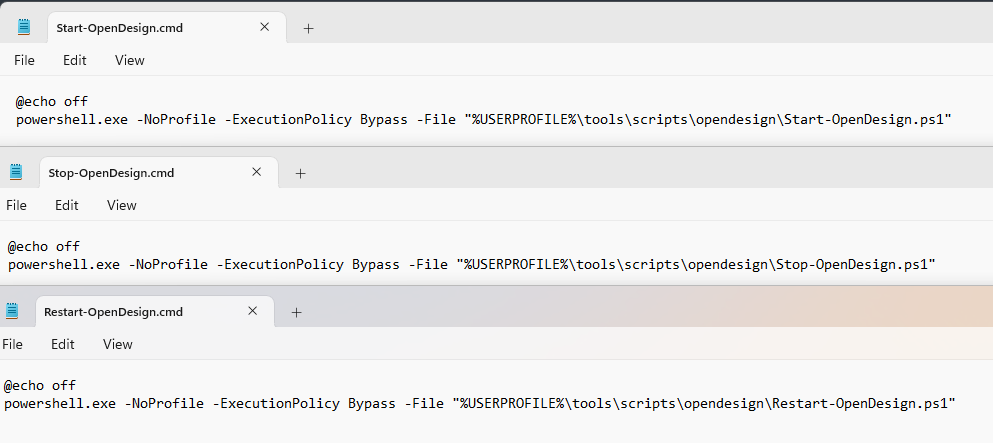
They simply call the corresponding PowerShell scripts.
After adding the script directory to the Windows PATH, I can launch from:
- Cmder
- CMD
- PowerShell
using:
Start-OpenDesign
Stop-OpenDesign
Restart-OpenDesign
The same files can also be used for:
- desktop shortcuts
- Start menu shortcuts
- pinned launcher entries
At that point OpenDesign behaves much more like a normal Windows application while the runtime remains completely inside Linux.
Why I did not create a Windows Service
A Windows Service was an obvious possibility.
I deliberately did not use one.
The runtime already has a service manager:
systemd
Adding a Windows Service would produce:
Windows Service
    ↓
WSL
    ↓
systemd
    ↓
OpenDesign
That is unnecessary duplication.
It would introduce:
- another startup lifecycle
- WSL boot timing concerns
- user-session differences
- more complex debugging
- another service manager to maintain
The cleaner model is:
Windows launches. WSL manages.
If I later want OpenDesign to start automatically when I log into Windows, Windows Task Scheduler would be a more appropriate integration than a Windows Service.
Should WSL remain running?
While OpenDesign is running, yes.
That is expected.
The runtime is:
Windows
    ↓
WSL
    ↓
systemd
    ↓
OpenDesign
There is no need to keep an Ubuntu terminal window visible.
The distro remains alive because OpenDesign is running.
When OpenDesign and other WSL processes stop, WSL can shut down naturally.
What happens if Windows shuts down abruptly?
There is no special daemon cleanup required.
When Windows shuts down:
- WSL stops
- systemd stops
- OpenDesign stops
- agent processes stop
- child processes disappear with the WSL VM
After the next Windows boot, I simply start OpenDesign again.
There is no stale Linux daemon surviving across a reboot.
The only general caveat is the same as with any application: if the machine loses power while a file is actively being written, that write could be interrupted.
But the process lifecycle itself remains clean.
Keeping the OpenDesign repository clean
This became one of the most important maintainability decisions.
I do not put operational customization inside:
~/tools/open-design
The repository remains upstream-clean.
My custom files live outside it.
Linux-side customization
~/bin
~/.config/systemd/user
~/.local/bin
Windows-side customization
C:\Users\<user>\tools\scripts\opendesign
That means:
git pull
can remain straightforward.
No launcher scripts need to be merged.
No systemd file lives inside the repository.
No Windows integration lives inside the repository.
No local patch exists unless I intentionally choose to create one.
This dramatically reduces future maintenance.
Updating OpenDesign
The future update workflow remains simple.
Conceptually:
- Stop OpenDesign.
- Enter the Git checkout.
- Pull the latest source.
- Refresh dependencies if required.
- Rebuild the web package.
- Restart OpenDesign.
systemctl --user stop open-design

cd ~/tools/open-design

git pull
pnpm install
pnpm --filter @open-design/web build

systemctl --user start open-design
systemctl --user status open-design --no-pager
The Windows launchers and systemd configuration stay untouched unless OpenDesign itself changes its startup contract.
That is exactly what I want.
Updating agents independently
OpenCode, Codex, Claude, Gemini, and Antigravity are independent tools.
They should remain independently managed.
That means:
- OpenDesign updates do not silently change Codex
- Codex updates do not alter OpenDesign
- OpenCode can move at its own pace
- each tool keeps its own authentication
- model availability follows the local agent version
- agent-specific issues can be isolated more easily
This separation already helped diagnose both Codex and OpenCode issues.
Local OpenCode versus BYOK OpenCode
OpenDesign exposes both:
OpenCode
BYOK OpenCode
They are conceptually different.
Local OpenCode means OpenDesign launches the OpenCode CLI already installed in WSL.
That CLI uses its own:
- credentials
- provider configuration
- model configuration
- local environment
BYOK means:
Bring Your Own Key
That execution path is intended for API-backed usage where the model/provider credentials are supplied separately.
For my environment, local OpenCode is the natural fit because OpenCode already belongs to the WSL runtime.
The current blocker is adapter compatibility, not architecture.
Model strategy
Once Codex was updated and working through OpenDesign, the next decision became model selection.
For an iterative design environment, the strongest available model is not necessarily the best default.
OpenDesign encourages repeated cycles of:
- layout refinement
- spacing
- typography
- responsive fixes
- component changes
- visual iteration
- implementation adjustments
Using the most expensive model for every small iteration is wasteful.
A more sensible strategy is:
- fast/value model for routine changes
- stronger reasoning model for difficult implementation work
- top-tier model only when the task justifies it
The general principle is:
Use capability proportional to task difficulty.
The final architecture
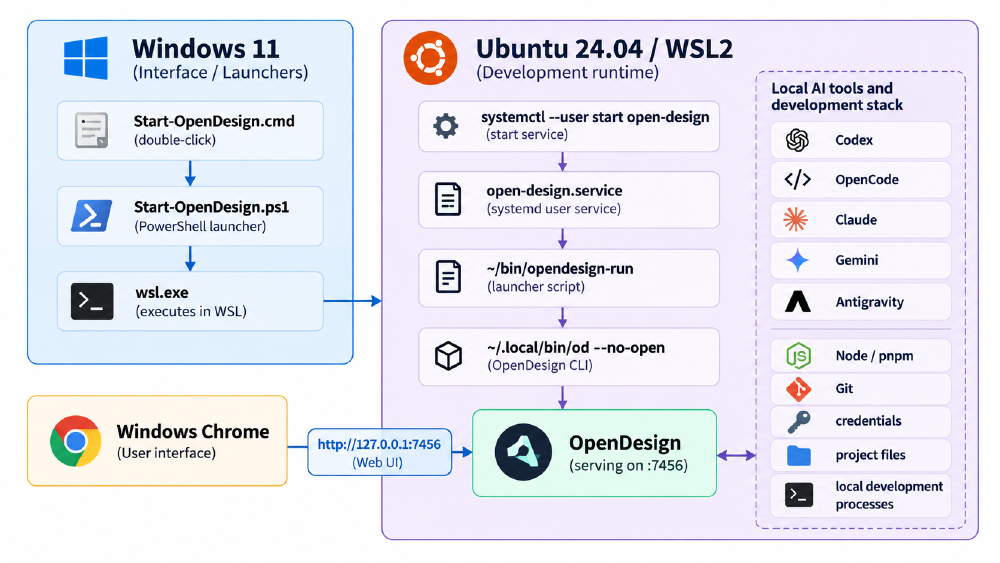
Windows 11
│
├── Start-OpenDesign.cmd
│       ↓
├── Start-OpenDesign.ps1
│       ↓
├── wsl.exe
│       ↓
│
└──────────────► Ubuntu 24.04 / WSL2
                 │
                 ├── systemctl --user start open-design
                 │       ↓
                 ├── open-design.service
                 │       ↓
                 ├── ~/bin/opendesign-run
                 │       ↓
                 ├── ~/.local/bin/od --no-open
                 │       ↓
                 └── OpenDesign :7456
                         │
                         ├── Codex
                         ├── OpenCode
                         ├── Claude
                         ├── Gemini
                         ├── Antigravity
                         ├── Node / pnpm
                         ├── Git
                         ├── credentials
                         └── project files

Windows Chrome
      │
      └──────────────► http://127.0.0.1:7456
The Windows browser is merely presenting the application.
The entire development runtime remains inside WSL.
What I would do differently if starting again
With hindsight, I would skip many of the intermediate experiments.
I would go directly to this sequence:
- Install Ubuntu on WSL2.
- Keep development projects inside the Linux filesystem.
- Install AI coding agents inside WSL.
- Install OpenDesign inside WSL.
- Resolve the Linux
odnaming collision immediately. - Make NVM and Node versions deterministic.
- Keep Windows PATH out of Linux unless explicitly needed.
- Add a reliable WSL-to-Windows browser bridge.
- Build the OpenDesign web package.
- Run OpenDesign through
od --no-open. - Keep the stable
7456endpoint. - Manage OpenDesign through a systemd user service.
- Make the systemd launcher self-contained.
- Keep operational scripts outside the Git checkout.
- Use Windows PowerShell only as a frontend launcher.
- Use health checks instead of arbitrary sleeps.
- Validate each local agent independently.
- Keep agent authentication independent from OpenDesign.
- Keep agent upgrades independent from OpenDesign.
- Avoid a Windows Service unless there is a real system-level requirement.
That would avoid most of the detours.
This pattern is bigger than OpenDesign
The most useful lesson from this setup is that it is not really an OpenDesign-specific pattern.
The same architecture works for many developer tools that:
- run best in Linux
- expose a local browser UI
- launch command-line agents
- depend on Linux project files
- need credentials and package managers
- are used from a Windows desktop
The reusable pattern is:
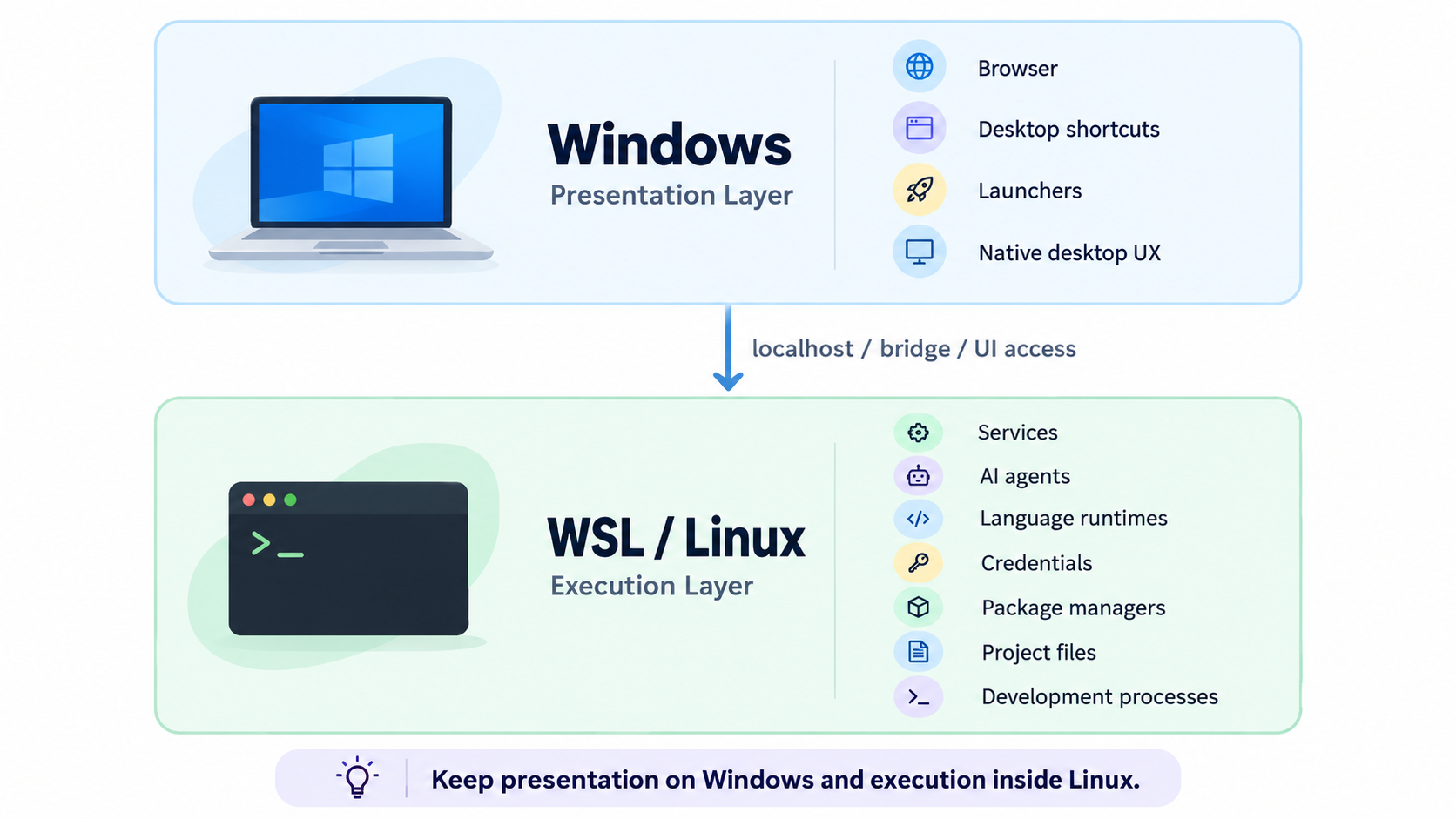
Windows
│
├── browser
├── shortcuts
├── launchers
└── desktop UX
        │
        ▼
WSL
│
├── services
├── agents
├── runtimes
├── credentials
├── package managers
├── project files
└── development processes
The important boundary is between:
presentation
and:
execution
Once that boundary is explicit, WSL stops feeling like “a Linux terminal inside Windows.”
It becomes the actual development machine.
Windows becomes the interface to it.
Final result
The finished setup gives me exactly what I wanted.
OpenDesign feels like a Windows application.
But technically, it is not running on Windows.
It runs inside WSL alongside the rest of the development stack.
That means:
- OpenDesign stays in Linux.
- OpenCode stays in Linux.
- Codex stays in Linux.
- Claude stays in Linux.
- Gemini stays in Linux.
- Antigravity stays in Linux.
- Node stays in Linux.
- pnpm stays in Linux.
- Git stays in Linux.
- credentials stay in Linux.
- project files stay in Linux.
- systemd manages service lifecycle.
- Windows handles Chrome and launchers.
- one stable localhost endpoint exposes the UI.
- no Ubuntu terminal needs to remain open.
- no random ports need to be remembered.
- shutdown naturally cleans up the runtime.
- the OpenDesign repository remains clean.
- updates remain manageable.
- agents can evolve independently.
What began as an OpenDesign setup problem turned into a broader architecture decision.
I did not need to choose between Windows and Linux.
I needed to decide which responsibilities belonged to each.
Windows is excellent at being my desktop.
WSL is excellent at being my development machine.
Once those boundaries were explicit, the setup became much simpler.
One desktop. Two environments. One development workflow.
Windows handles the interface. WSL owns the runtime.